Mixing

The Art Of

OVERVIEW

Do you dream becoming the next mixing maestro but find yourself drowning in a sea of knobs, sliders and confusing plugins?

Fear not, because you’ve just stumbled upon the most comprehensive and educational mixing course. By the end of the curriculum, you’ll be mixing like a pro, with the confidence and skills to back it up.

MODULES


Know your tools before you begin mixing. This module covers:


–   What is a Mixer?

 –  Types of Mixer

 –  Inputs & Ouputs

 –  Sections & Channel Strips

 –  Metering

 –  Signal Flow

 –  Control Surfaces


The direction you want your mix to take is paramount. Key highlights are:


–  Having a Concept & Objective

–  Choosing Reference Tracks

–  Genre Specific Mixing

–  Ear Fatigue

–  Mixing Headphones Vs Monitors

–  Three Dimensional Mix

–  Common Mistakes in Mixing

–  Revision


Getting the prelimanary balance of the tracks before getting started would place you in a better position in mixing. You’ll learn:


–  Organizing Tracks

–  Setting Initial Levels

–  Gain Staging

–  Bottom Up & Top Down Mixing

–  Phase Cancellation

–  Mono Compatibility

–  Reading the Meters

–  Building a Mixing Hiearchy


Time to start shaping your mix. Implement the elements in order to build a landscape with tracks. Lets begin with panning. 

Some of the areas covered in this module are:


–  Mixing Perspective

–  Clockface Approach

–  Panning of Instruments

–  Verse Vs Chorus Panning

–  Avoiding Common Mistakes


Removing and adding frequencies and bring your mix to life. Some of the highlights are:


–  Fundamentals

–  Frequency Bands

–  Types of EQ

–  Subtractive Vs Additive EQ

–  Creative EQ

–  Avoding Common Mistakes


Compression can make or break your mix.  Students will gain expertise in various aspects such as:


–  Understanding the Parameters

–  Types of Compressors

–  Series Compression vs Parallel Compression

–  Sidechain

–  Multiband Compression

–  Low End Compression

–  Avoiding Common Mistakes


Creating a space and adding depth using Reverb adds life to a mix.

Some key chapters to be covered are:


–  What ixs Reverb & Why?

–  Type and Paramenters

–  Send Vs Insert

–  Pan & Pre

–  Spatial Enhancements

–  Tonal Balance

–  Transients Processing

–  Harmonic Enhancements

–  Final Limiting & Maximization

–  Delivery Formats & Metadata

–  Client Communication


Delay is a versatile tool in production that can significantly enhance the quality and emotional impact of track by adding complexity and interest to the groove of the music. You’ll learn:


–  Purpose of Delay

–  Types Of Delay

–  Chorus

–  Flanger

–  Phaser

–  Processing & Automating Delay

–  Creative Dealy


Automation is a powerful tool that enhances both the technical and creative aspects of music mixing adding subtle dynamic changes, precision and consistency in your production: Students will grasp:


–  Automation Modes

–  Binary, Static and Real Time Automation

–  Audio Automation

–  MIDI Automation

–  Automation for Dynamics, Effects & Fades

–  Automating VSTs & Plug-in Parameters
 

Career

Opportunities

Testimonials

"My mixes went from 'What is that noise? to 'Wow, who's that artist? halfway during the course. Even my dog is impressed. This course taught me that automation isn't about robots taking over - its about making my mixes do cool stuff while i chill with a cup of coffee."
Jack D.
Student, Art Of Mixing
"This course transformed my approach to mixing and equipped me with the skills and confidence to produce professional-quality mixes."
Athol C.
Student, Art Of Mixing

FAQS

No, this course accommodates beginners with little or no prior knowledge. Also, students with production experience can gain significant insight from this course.


No, while some basic understanding of music theory can be helpful, its not required as the course covers the necessary musical concepts.


Yes, upon successfully completing the course, you’ll receive a certificate.


Students can use any Digital Audio Workstations (DAWs) such as Ableton live, FL Studio, Logic Pro, Reaper, Cubase or Pro Tools.


You’ll need a computer with sufficient processing power and RAM to run your choosen DAW smoothly as well as a MIDI keyboard/controller (recommended).


A one-on-one session provides personalised instructions and feedback as only one student is in attendance with the instructor. Sessions are conducted through video calls and using screen sharing, instructor demonstrates techniques, critiques your work and assign tasks. The loopback feature allows you to hear exactly what instructor is hearing enhancing functionality and versatility hence enabling creative possibilities and streamlining course flow.


Absolutely! Any questions students may have even after the course is completed will be answered and addressed at the earliest.


Yes, the course includes hands on assignments and projects to help reinforce the concepts learned.


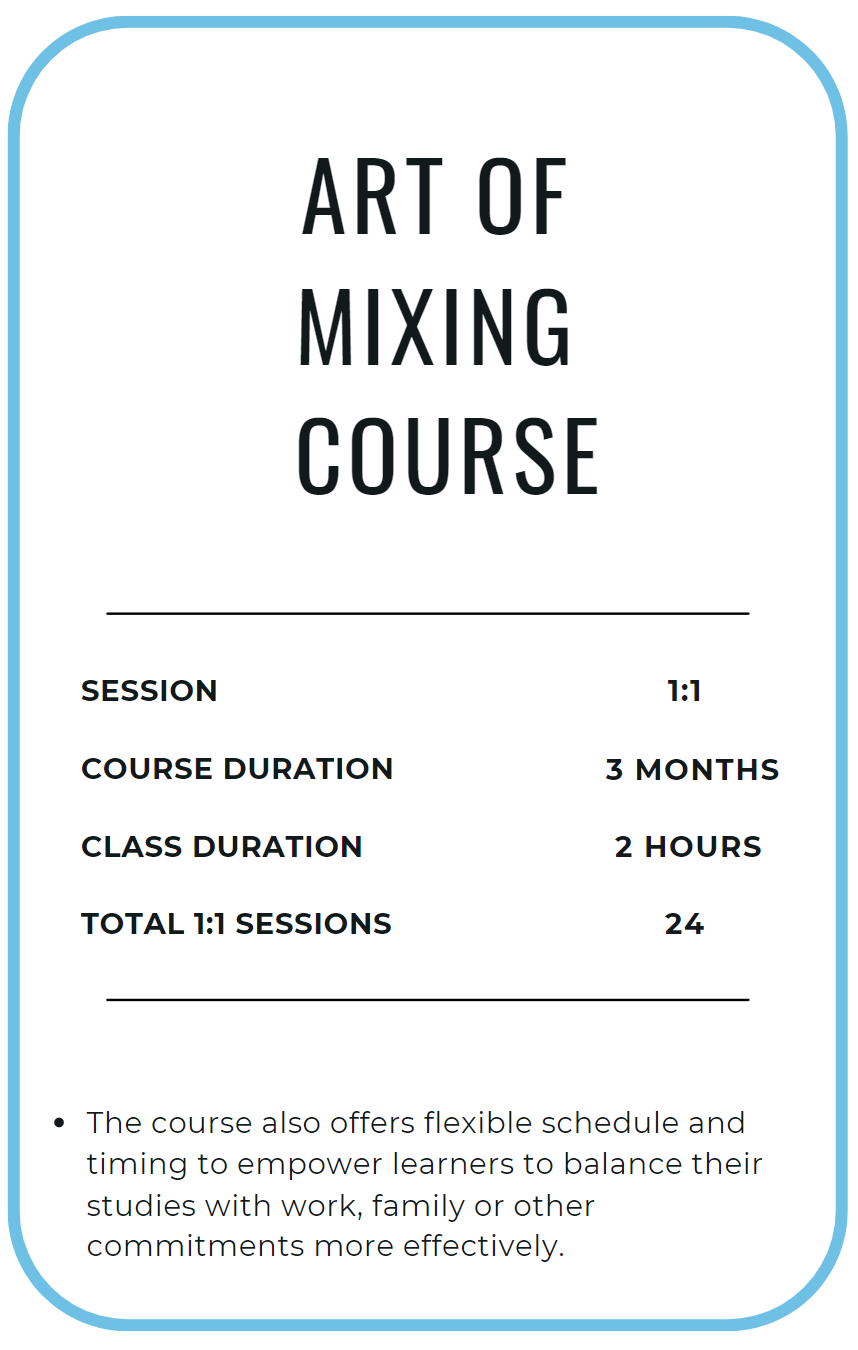
The course is 3 months long including 24 one-on-one sessions. Each session lasts for 120 mins, twice a week. 

Moreover, being 1:1 sessions, the scheduling can be altered and catered to student’s convenience.

Contact